Sentiment analysis is a technique used to determine whether data has a positive, negative or neutral sentiment. A company might analyse a variety of tweets to find out if its new shoe is well received. Somebody who worked in the car industry once told me, that either positive or negative reviews for a new car are fine. The worst than could happen is that people do not show any interest at all. I keep it for you to decide if that is actually true.
In this post we will perform sentiment analysis on product reviews written by customers. Reviews are suitable for sentiment analysis, because they normally reflect a clear opinion about something. A platform that daily generates new reviews is amazon. However, amazon discourages data scraping in its policy. Luckily, amazon provides several data sets of customer reviews of different product categories. All data sets can be found here. For our analysis we will use the customer reviews of electronics which can be found here.
Data exploration
Before we build our model and train it on the data we examine it first. This is important, because even the best model will not shine if it is fed poor data. For the exploration we will use pandas. For each review in the dataset different information is provided. We are only interested in the star rating and the corresponding review text. The rest of the information is ignored, because we like to estimate the sentiment solely on the review text. Depending on the application it is a good choice to consider all data.
We start by looking at the star rating. A histogram of the rating can be seen in the plot below.
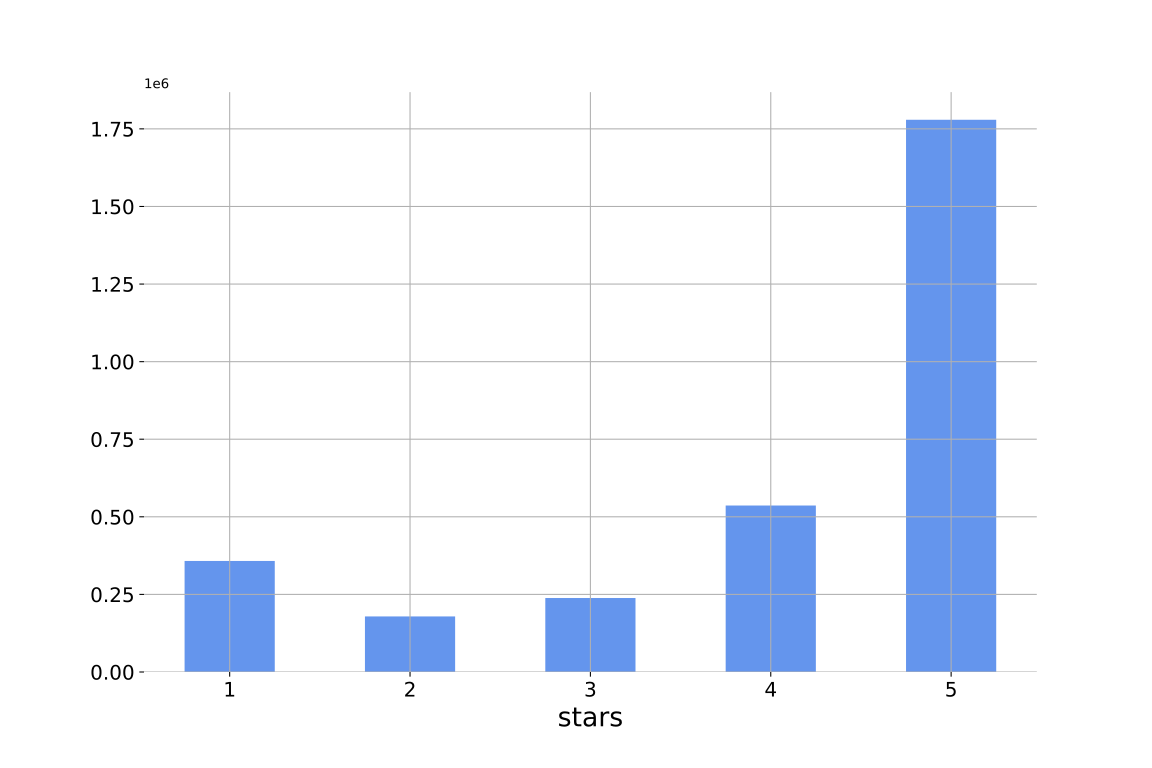
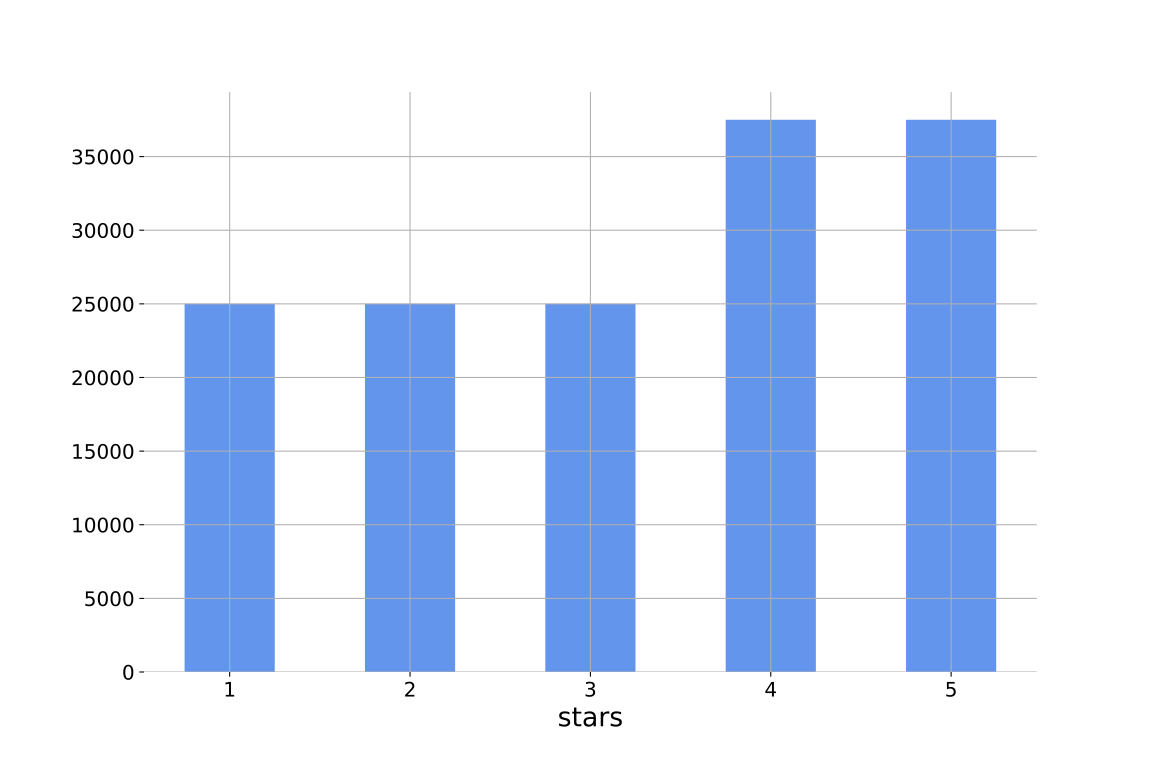
It can be seen that a major portion of the customers has decided to give a five star rating in their review. This is a good thing for amazon, but might lead towards a bias in our trained model. For our analysis we will make the assumption that a review is either positive or negative. Therefore, we formulate the analysis as a binary classification problem. The first class is denoted as 0 or negative and contains all reviews with three or less stars. The other class is denoted as 1 or positive and contains the remaining reviews. To reduce class imbalance and computation time, we sample a new data set from the data set. The star rating histogram of the new data set can be seen in the plot below.
Data preprocessing
The next step is to preprocess the data. There are several different preprocessing techniques we can make use of. Each task has its tools. Some preprocessing steps are beneficial for analysis, others are not. So, one has to make a reasonable choice on how to preprocess the data. For our analysis we will take the following steps:
- Remove empty or invalid reviews
- If a review consists only of a star rating without text, there is no need to analyse it.
- We also remove a review if someone has written the actual star rating into the review text for the same reason.
- Remove noise
- Text obtained from sources like books or newspapers usually undergoes quality control. Reviews like ours usually do not undergo such control and therefore are noisy. They will contain typographical errors and smileys, among other things. These can interfere with our analysis, which gives us enough reason to remove them.
Remove punctuation
- We remove punctuation
!"#$%&\'()*+,-./:;<=>?@[\\]^_`{|}~.
- We remove punctuation
Remove stop words
- Stop words usually have a high frequency, but do not contribute much information. Removing them can decrease the computational effort. We should choose an appropriate set of stop words we will remove. Some for example consider not as a stop word. Keep in mind “I do recommend the product” and “I do not recommend the product” have an opposite meaning.
Tokenize words
- Usually the reviews are written in whole sentences. Instead of processing the reviews sentencewise we process them wordwise. To do so, we have to split each sentence into the words that make it up. In natural language processing words are also called unigrams.
Change to lower case
- In the German language all nouns are capitalized. With some exceptions, all words in the English language are written in lower case. Setting all words in lower case will not interfere with our analysis, but can reduce the amount of words to consider. Otherwise, we have to consider Book, book and BOOK as separate words. Except the increased computation effort, our model would have to learn that these words have the same meaning.
Data Encoding
After performing these steps a crucial step is left before we can start building our model. While letters are designed to be read by humans, computers are designed to work with numbers. To allow our model to work with our reviews, we have to translate them in a reasonable way. One option is to use one-hot encoding. In this case each word will be represented as a vector of size n, where n is the number of unique words in our reviews. So, for each word one certain entry will be equal to one and all other will be equal to zero. One downside of this approach is the high memory consumption. Another is that based on this encoding there is no relation between the words. Each word has the same Hamming-distance of one to all other words.
A different approach is to use word embeddings. In short, each word will be associated with some dense high-dimensional vector of size m, where m is a hyper parameter. The entries of the vectors are real numbers. The major difference is that we learn the vector representation of each word. This has two benefits. First, we hopefully learn a representation in which associated words have close vectors. This closeness could be measured using the scalar product between vectors. Second, it allows us to encode the words using smaller vectors m < n. Word embeddings are a broad topic. For an overview have a look at this blog post here. We do not intend to reuse our embeddings for another project. Therefore, we train our model and learn the embeddings simultaneously.
Build our model
Now that we have prepared the data and decided on how we encode them, we can proceeded to the model we will use. Our data is sequential. That means that the order of the words matters, because the current word will usually depend on the previous words. Due to this, a reasonable approach should be chosen which can account for this. One technique used with such data is to use recurrent neuronal networks (RNN). RNNs have a so called hidden state which can account for previous input. It is provided to the network in each time step with the current input. They also have the advantage that they can handle variable input size. This is necessary, due to sentences usually having different length. For more information on RNNs I recommend to have a look at this chapter from the book Deep Learning. For those who prefer lectures try this video series on RNNs.
While in theory RNNs are a suitable architecture for our data, training them can be difficult. We consider two problems occurring in this context. One is the so called exploding gradient. As the name says, it leads to huge gradients which make the training unstable. It has a similar effect to choosing an inappropriate learning rate. We handle this problem by clipping the gradients if their norm exceeds a predefined value. Another problem is the vanishing gradient problem. It is somehow the opposite of the exploding gradient. Gradients become too small for our model to be trained. To my knowledge, this problem is currently not completely solved. One way to improve it is to use long short-term memory (LSTM). Using LSTM has other benefits besides improving on the vanishing gradient problem. It allows for long term dependencies to be learned where RNNs without LSTM have difficulties. If you like to learn more on LSTM have a look at the blog post found here.
For the core of our model we will use the LSTM that comes with PyTorch. PyTorch also allows to stack LSTM with ease, so that the output of one LSTM is the input to another LSTM. Below you can see the code for our model. We use three linear layers with a ReLU activation for the first two. Due to performing binary classification, we set the output size of our output layer to two and use a LogSoftmax to obtain log probabilities. To reduce overfitting we use dropout in the first two linear layers with a dropout probability of 0.2. The function init_hidden() initializes the hidden state and the cell state of our model with zeros. The hidden state and the cell state both have to be initialized for each review processed. I also have seen that others initialize both randomly instead of setting them to zeros.
class LSTM(torch.nn.Module):
    def __init__(self,input_dim,hidden_dim,output_dim,batch_size,n_layer,embedding_dim):
        super().__init__()
        self.input_dim = input_dim
        self.output_dim = output_dim
        self.hidden_dim = hidden_dim
        self.batch_size = batch_size
        self.n_layer = n_layer
        self.embedding_dim = embedding_dim

        self.dropout = torch.nn.Dropout(p=0.2)
        self.embedding = torch.nn.Embedding(embedding_dim,input_dim,padding_idx=0)
        self.lstm = torch.nn.LSTM(input_dim,hidden_dim,num_layers=n_layer)
        self.linear1 = torch.nn.Linear(hidden_dim,hidden_dim*2)
        self.linear2 = torch.nn.Linear(hidden_dim*2,int(hidden_dim*(1/3)))
        self.linear3 = torch.nn.Linear(int(hidden_dim*(1/3)),2)
        self.relu    = torch.nn.ReLU()
        self.log_softmax = torch.nn.LogSoftmax(dim=1)

    def init_hidden(self):
        hidden = torch.zeros(self.n_layer,self.batch_size,self.hidden_dim)
        cell = torch.zeros(self.n_layer,self.batch_size,self.hidden_dim)
        return (hidden,cell)

    def forward(self,input_data,hidden):
        out,(hidden,cell) = self.lstm(input_data,hidden)
        out = self.dropout(hidden[-1])
        out = self.relu(self.linear1(out))
        out = self.dropout(out)
        out = self.linear2(out)
        out = self.relu(out)
        out = self.linear3(out)
        return self.log_softmax(out)
Training our model
Before we train our model we split the data into proper subsets for training, testing and validation. The set for training contains 80% of the data and the other two 10% each.
One important detail is how we provide the input to our model. As said before, we like the model to learn the word embeddings while we train the model. For this we use the Embedding that comes with PyTorch. In the documentation it says
A simple lookup table that stores embeddings of a fixed dictionary and size.
This module is often used to store word embeddings and retrieve them using indices. The input to the module is a list of indices, and the output is the corresponding word embeddings.
Consequently, we can provide it an index and obtain the corresponding word embedding. For this to work we have to assign a unique integer to each word to associate it with a certain embedding. So, before we can start the training we find all unique words and assign an integer to each one. An easy way to encode words is to use a dictionary. In the following we will provide a list of indices to the embedding and obtain a matrix with word embeddings. The word embeddings are learned on their own during the model training with gradient descent.
Another important detail is the use of mini batches. Some people write a lot in their reviews and other keep it short. This results in a variable length of the text reviews. Tensors are fixed in each dimension and not intended to be used with data of variable length. One approach is to set a fixed review length and cut off the review if it exceeds this length. If it is too short we can pad it with zeros. While this approach is valid it is not ideal. For this, PyTorch provides a much more elegant way to do this. It provides the functions pad_sequence() and pack_padded_sequence(). The first allows to pad all reviews to the same length, which allows us to store mini batches comfortably in a tensor. Depending on the data this can lead to a lot of zeros in the data and hence to several unnecessary computations. The function pack_padded_sequences() brings the data into a format that is accepted by the LSTM in PyTorch and allows PyTorch to account for the zeros.
Our model outputs log probabilities. Since we perform a classification we can use the negative log likelihood loss as loss function for training. For the optimization the Adam optimizer is used. The gradients are clipped if the Euclidean norm of the gradients exceeds five.
If you train the model on your CPU it will take a substantial amount of time. I would recommend training it on a GPU if you can. In case you have no GPU you can try using Google Colab like I did.
Results
In the following we will evaluate the result achieved with the trained model. Here is an overview of the model and training parameters.
| dim word embeddings | 50 |
| size of hidden and cell state | 500 |
| dim first hidden layer | 500 x 1000 |
| dim first hidden layer | 1000 x 166 |
| dim first hidden layer | 166 x 2 |
| batch size | 64 |
| learning rate | 0.005 |
| number of stacked LSMT | 2 |
| P_dropout | 0.2 |
| iterations of training | 2 |
To avoid overfitting a validation set is used. The training loss and the classification rate achieved on the validation set are recorded for every 100 processed batches. Both can be seen in the plot below.
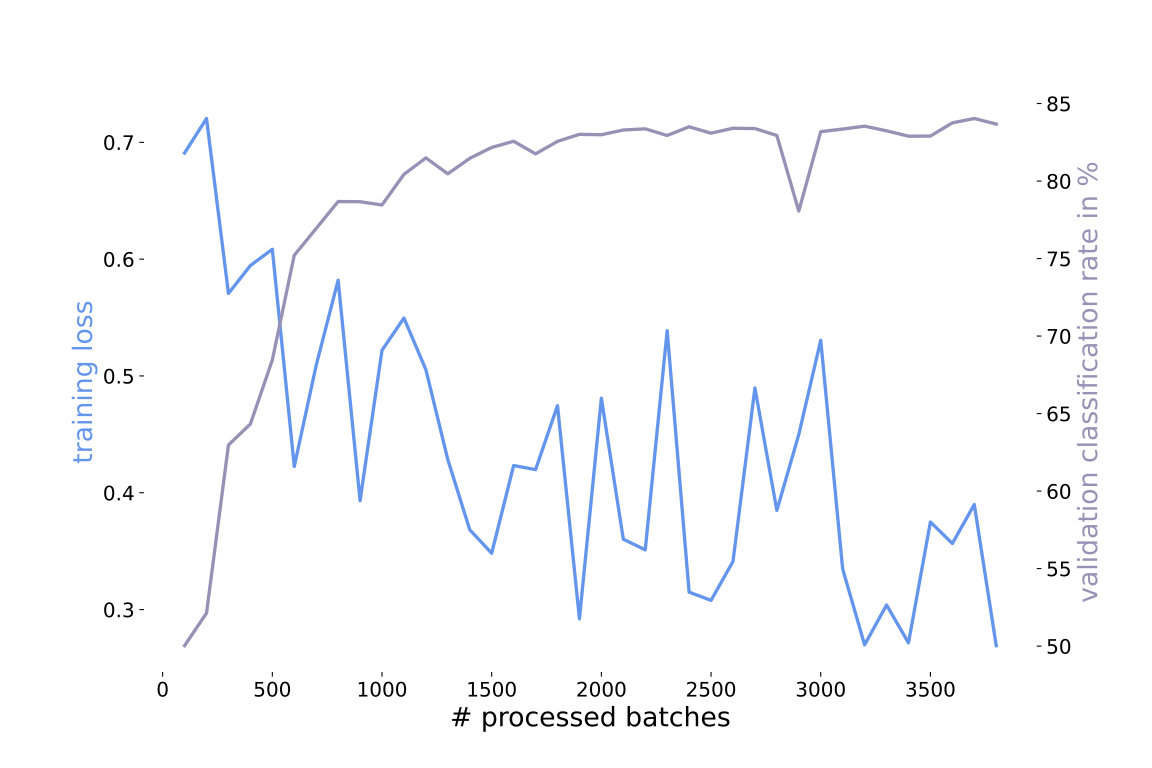
In the performed case, training the model for two iterations is sufficient to achieve reasonable results. Using the trained model allows to achieve a classification rate of 84.47% on the used test data. Let us try to come up with some reviews on our own and see if it can classify them correctly. At first we try the following positive review “Our dog enjoys breakfast with the new toaster”. This review was correctly classified as positive. Now, let us try a negative one “My friend was not as excited as promised”. This review was classified as negative like we intended.
While our two examples are classified correctly, on the test set 1⁄7 of all reviews are misclassified. So, let us examine the misclassified reviews and try to get some insight. First, we find out how well the reviews with each particular star rating were classified. In the plot below you can see the classification rate on the test data for reviews with different star rating.
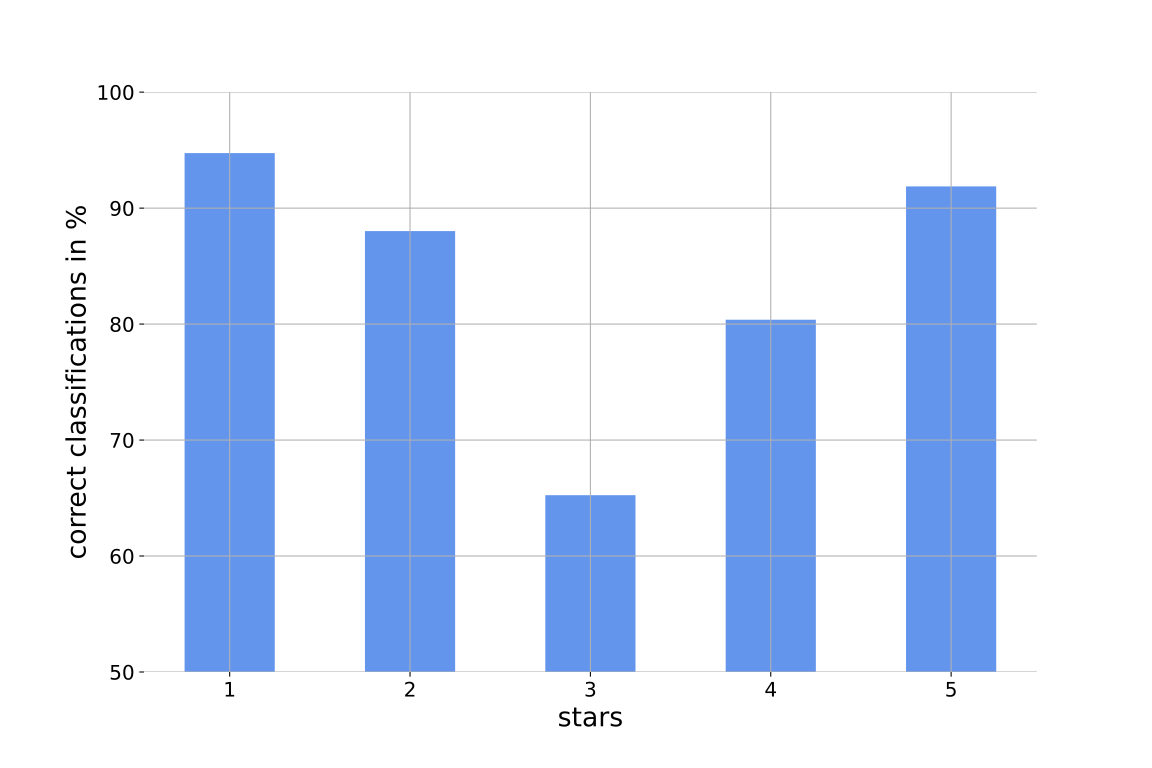
We observe that the best classification rate is achieved on reviews with the most extreme star ratings. This is not surprising. In general the more a data point tends towards one side, the more confident we can be that it belongs to the class corresponding to this site. In our case we put the decision boarder between three and four stars. In the plot below, we can see how the misclassification of reviews with a certain rating contributes to the overall misclassifications.
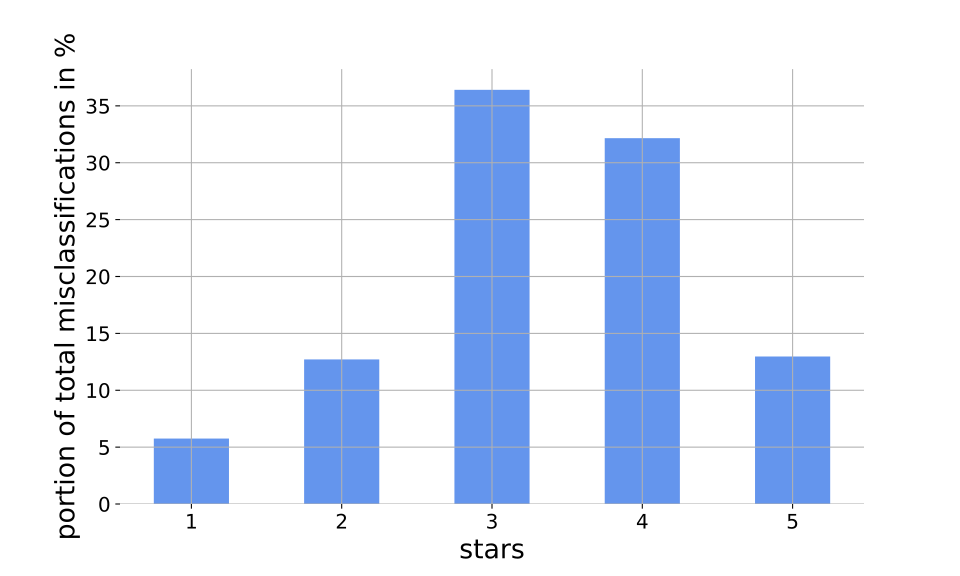
As expected the reviews with three and four stars contribute the most to the misclassifications. The problem with reviews is that they are written by many different people. The author of a review has to decide for a star rating and a review text which hopefully explains why a certain rating is given. To choose between a three and a four star rating is much harder than choosing between a one star and a five star rating. Consider the following example
“work not well least not minecraft fine movies though”.
This is one of the reviews from the data. Based on this review I personally would have said that it is a negative review, because the author clearly says that it does not work well. The model also classified it as negative. To my surprise the corresponding star rating is four stars, which I consider as good rating. Another example is the following
“seem okay big ears aware large size eargels”.
The model classified it as positive but the rating was only three stars. These examples are not representative, but show that it is hard to put some reviews in one of the categories. To improve we could try using more data. Another approach can be to use the over data that comes with each review. Using this additional information could allow to increase the classification rate.
While looking at the misclassified examples I recognized that many of them are relatively long. The average character number of a review text in the test set is 262.23 characters, while the average character size of the misclassified review texts is 321.48 characters. So, the misclassified review texts are 18.43% longer than the average review text in the test set. This indicates that our model tends to misclassify reviews with longer text. I assume that a brief and on the point review is easier to classify as one which is beating around the bush.
Closing words
We have covered the process from preprocessing the data to a working trained model. On the test data our model achieves a classification rate of around 85%. While this is a nice result, there is room for further improvement. From here, different things could be tried. For example, more data can be used to train the model or additional information can be provided to the model. The reviews come with information like a headline or the number of people who found this review useful. I assume that somebody will find a review helpful if it states a clear position about the product. Further, the hyperparameters of the model could be optimized or the architecture itself can be modified. Another approach is to use an ensemble classifier. The idea is to combine several models to build a more accurate model. Two common techniques are boosting and bagging, but this is a topic for another post. See you around.